
AI Tool Guides
n8n vs Zapier vs Make: Which Should You Use?
Some links in our roundups are affiliate links: if you buy through them we may earn a commission, at no extra cost to you. It never changes which tools we recommend or where they rank — we only list tools we would genuinely tell a friend to use.
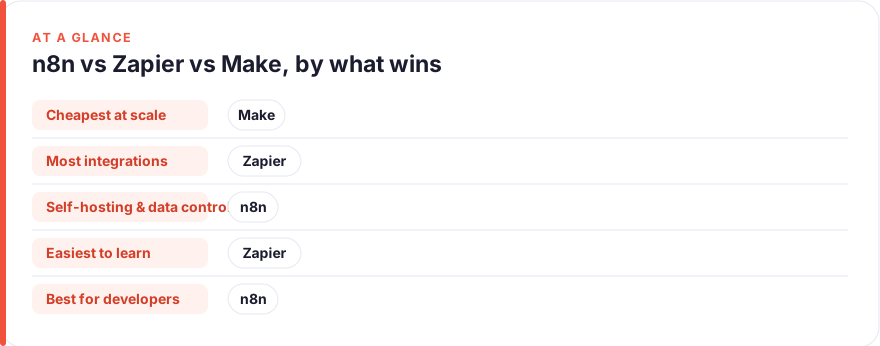
The short answer: Pick Zapier if you want the easiest setup and the biggest app catalogue and you are happy to pay per action. Pick Make if you want a visual builder that stays cheap as volume grows. Pick n8n if you are technical, care about self-hosting and data control, or want the lowest cost at scale. All three do the same core job; the difference is what they charge for, how steep the learning curve is, and how much you can host yourself.
Every “best automation tool” list eventually collapses into the same three names: n8n, Zapier and Make. They overlap enough that a lot of guides just declare a winner and move on. That is not very useful, because the right answer depends almost entirely on how you count cost, how comfortable you are with a more technical tool, and whether hosting your own automations matters to you.
This comparison takes a different approach. We built and priced one identical workflow through all three, then broke down pricing at three realistic usage levels, the learning curve, where each platform’s integration catalogue has gaps, and the self-hosting question that increasingly separates n8n from the other two. We have no affiliate relationship with any of these tools; see our disclosure and about pages for where we stand. Prices below are an August 2026 snapshot and change often, so confirm on each vendor’s site before you commit.
The 30-second answer
If you only read one section, read this one.
- Zapier is the most beginner-friendly and has the largest app catalogue, but its per-task pricing means cost climbs fastest as your workflows get busy. Best for non-technical users and simple, lower-volume automations.
- Make gives you a visual, branching canvas and stays noticeably cheaper than Zapier at the same volume. A sensible middle ground for people who want power without a self-hosted server.
- n8n is the most flexible and the cheapest at scale, and it is the only one of the three you can self-host for full data control. The trade-off is a steeper, more technical learning curve.
The single most important thing to understand is that the three tools meter usage differently, and that difference — not the sticker price — is what decides which is cheapest for you.
The test: one workflow, three tools
To make the comparison concrete, we built the same automation on each platform: a new form submission comes in, the record is enriched with a lookup, a row is added to a Google Sheet, a Slack message is posted to the team, and a confirmation email goes back to the submitter. That is one trigger plus four actions — a completely ordinary five-step workflow.
We assumed it runs 500 times a month. Here is where the metering difference bites. Watch the units.
| Tool | What one run costs you | Monthly usage at 500 runs | Plan it lands on | Monthly cost |
|---|---|---|---|---|
| n8n | 1 execution (whole workflow, any number of steps) | 500 executions | Cloud Starter (2,500 execs) | €20/mo (~$22), or free self-hosted |
| Make | 1 credit per module call (~4 billable modules) | ~2,000 credits | Core (10,000 credits) | $9/mo |
| Zapier | 1 task per action step (trigger is free, ~4 tasks) | ~2,000 tasks | Professional (2,000 tasks) | $49/mo |
Same workflow, same volume — and Zapier costs roughly five times what Make does, because Zapier bills every action step while n8n bills the run as a whole. That gap only widens as workflows get more steps or run more often.
Build time was closer than the pricing. Rough, familiarity-dependent estimates from our build:
- Zapier was fastest to assemble at around 15 minutes. The step-by-step editor is linear and hard to get wrong.
- Make took roughly 25 minutes. The visual canvas and field mapping add a little friction but nothing that needs code.
- n8n took around 35 minutes, most of it in the enrichment node and (if self-hosting) the initial server setup. It is the most configurable, which is exactly why it takes longest.
Pricing compared at three usage levels
Because the units differ, the only fair way to compare price is to fix a real workload and see which plan each tool forces you onto. Below, “light”, “growing” and “heavy” describe the same four-action workflow running at increasing volume. All figures are annual-billing headline prices as of August 2026 — check the vendor, as every one of these changes.
| Usage level | Monthly volume | n8n Cloud | Make | Zapier |
|---|---|---|---|---|
| Light (~125 runs) | 125 execs / 500 credits / 500 tasks | Starter €20/mo (or self-host free) | Free (1,000 credits) | Professional $19.99/mo (750 tasks; Free’s 100 is too small) |
| Growing (~500 runs) | 500 execs / 2,000 credits / 2,000 tasks | Starter €20/mo | Core $9/mo | Professional $49/mo |
| Heavy (~2,500 runs) | 2,500 execs / 10,000 credits / 10,000 tasks | Starter €20/mo (at cap) → Pro €50/mo for headroom | Core $9/mo → Pro $16/mo | Professional $129/mo |
A few honest caveats behind the table:
- n8n Cloud has no permanent free tier — only a trial — so its realistic floor is the Starter plan at €20/mo (about $22). Its trick is that executions are cheap and step-count is irrelevant, so the same €20 plan absorbs a lot of growth. Self-hosting the free Community Edition drops the software cost to zero; you just pay for a small server.
- Make is the value story in the middle. Its free plan (1,000 credits) genuinely covers a light workload, and Core at $9/mo covers a surprising amount. Credits (formerly called “operations”) are counted per module call, so heavier, many-step scenarios burn them faster than the headline suggests.
- Zapier is the most expensive in every row, and the gap grows with volume: $49/mo at 2,000 tasks becomes $129/mo at 10,000. You are paying for polish and the biggest catalogue, not for efficiency. Zapier’s Free plan (100 tasks) is really a trial, not a workhorse.
For a fuller list of budget-friendly options beyond these three, our roundup of no-code automation tools covers the wider field.
Learning curve and time-to-first-automation
Price is only worth it if you can actually build what you need. Here the order reverses.
Zapier is the gentlest on-ramp by a wide margin. You pick a trigger app, pick an action app, map a few fields, and turn it on. The interface is linear — one step after another — and it holds your hand throughout. Most people get a first Zap live within their first sitting. If “automation” still feels intimidating, Zapier is the safest place to start.
Make asks a little more. Its canvas shows modules as connected bubbles you can branch, filter and loop, which is more powerful but also more to take in. The reward for the extra learning is real: routing, iterators and error handling that would be clumsy in Zapier feel natural in Make. Expect an afternoon to feel comfortable rather than an hour.
n8n is the steepest climb. It assumes you are comfortable with concepts like JSON, expressions, and — often — running your own server. The generic HTTP Request node lets you talk to almost any API, but that flexibility means fewer guardrails. A non-technical user can absolutely learn n8n, but it is not the tool to hand someone who has never automated anything. If you are weighing n8n specifically, our guides on whether n8n is free and the best n8n alternatives go deeper on the trade-offs.
| Zapier | Make | n8n | |
|---|---|---|---|
| Interface | Linear step editor | Visual node canvas | Visual node canvas |
| Time to first automation | ~1 hour | ~half a day | ~a day (plus setup if self-hosting) |
| Coding needed | None | None (optional) | Helpful, sometimes required |
| Best-suited user | Non-technical | Intermediate | Technical |
Integrations — where each has gaps
This is the category where raw numbers mislead most, so treat the counts below as directional, not gospel. Every vendor counts “integrations” differently — one app might expose a single trigger or a hundred actions — so the totals are not directly comparable.
| Native app catalogue (advertised) | The escape hatch | Practical gaps | |
|---|---|---|---|
| Zapier | Largest — commonly cited as 8,000+ apps | Webhooks (on paid plans) | Fewest gaps; if a mainstream SaaS exists, Zapier likely connects to it |
| Make | Large mid-tier — roughly 2,000+ apps | HTTP + webhook modules | Occasional missing niche app, usually bridgeable via HTTP |
| n8n | Smallest native set — around 400+ nodes | Generic HTTP Request node + community nodes | More manual wiring for obscure apps, but can technically reach any API |
The headline is counterintuitive: Zapier wins on breadth, but n8n has no hard ceiling. Because n8n’s HTTP Request node can call any REST API and its community publishes hundreds of extra nodes, its effective reach is unlimited for anyone willing to configure a request by hand. Zapier’s advantage is that those connections are pre-built and polished, so you rarely touch a raw API. Make sits comfortably between the two.
Self-hosting and data control
This is the cleanest dividing line of the whole comparison, and increasingly the reason teams choose one over the others.
n8n can be self-hosted; Zapier and Make cannot. Zapier and Make are cloud-only SaaS — your data flows through their servers, and you accept their data-handling terms as part of the deal. n8n offers a source-available Community Edition you can run on your own infrastructure, which means your automation data never leaves servers you control.
That matters in three situations: you handle sensitive or regulated data and need it to stay in-house; you want to avoid per-execution cloud fees entirely; or you simply prefer owning your stack. The cost of self-hosting is not zero — you take on server hosting (a small VPS is often enough), updates, and maintenance — but the software itself is free, and there is no metered usage bill at all.
For teams without the appetite to run a server, n8n also offers its own managed Cloud, which is the version we priced above. The point is that n8n gives you the choice; Zapier and Make do not.
Support, docs and community
All three are well-documented, but the shape of the support differs.
- Zapier has the most polished official support and help content, aimed squarely at non-technical users, plus a large user base generating tutorials for almost any app pairing. If you get stuck, someone has almost certainly written up your exact problem.
- Make has thorough official documentation and an active community forum. Its help leans slightly more technical than Zapier’s because the product is, but it is still very approachable.
- n8n has excellent technical documentation and one of the most active open-source communities of the three — a busy forum, a large library of shared workflow templates, and community-built nodes. Because it is developer-oriented, the best answers often come from the community rather than a support desk, which suits technical users and frustrates non-technical ones.
Broadly: Zapier’s support is best if you want to be helped, and n8n’s community is best if you want to tinker. Make lands in between.
Pick by scenario
Rather than crown one winner, here is the honest recommendation by situation.
| Your situation | Best pick | Why |
|---|---|---|
| Solo / non-technical — you want automations live today with zero fuss | Zapier | Easiest to learn, biggest catalogue; low volume keeps the higher price manageable |
| Small team, cost-conscious — growing volume, some patience to learn | Make | Cheapest hosted option at real volume, with a visual builder that scales in capability |
| Technical team / builder — you want control, low cost at scale, or self-hosting | n8n | Cheapest per unit of work, unlimited API reach, and the only self-hostable option |
| Enterprise with compliance needs — data must stay in-house | n8n (self-hosted) | Full data control on your own infrastructure; the others are cloud-only |
If none of these fit cleanly, start on a free or entry tier and prove one workflow before you commit — the switching cost is real, but building the same automation twice while you decide is cheap insurance.
FAQ
Is n8n really cheaper than Zapier and Make?
At the same workload, usually yes — sometimes dramatically. Because n8n bills per whole execution rather than per action step, a five-step workflow costs the same as a one-step workflow on n8n, while Zapier charges for each of those steps. Self-hosting the free Community Edition removes the software fee entirely. The catch is that “cheaper” assumes you can handle a more technical tool, and self-hosting adds maintenance work that has its own cost in time.
What is the difference between tasks, credits and executions?
They are three different billing units, and confusing them is the most common pricing mistake. A Zapier task is a single action step, so one run of a five-step workflow uses four or five tasks. A Make credit (formerly called an “operation”) is one module call, counted similarly per step. An n8n execution is one entire run of a workflow, regardless of how many steps it contains. This is exactly why the same workflow can cost wildly different amounts across the three.
Can I self-host Zapier or Make like n8n?
No. Zapier and Make are cloud-only services — there is no self-hosted version, so your data always passes through their infrastructure. n8n is the only one of the three with a self-hostable Community Edition, which is a large part of why technical and privacy-conscious teams choose it.
Which is easiest for a non-technical beginner?
Zapier, comfortably. Its linear editor and enormous library of pre-built app connections mean most people build a working automation on their first attempt without touching anything that looks like code. Make is a reasonable second choice; n8n is the hardest to start with and not the one we would hand to a complete beginner.
Do I need to know how to code to use n8n?
Not strictly, but it helps a great deal. You can build many workflows using n8n’s visual nodes alone, but you will hit expressions, JSON data and the generic HTTP Request node sooner than you would on Zapier or Make, and self-hosting adds server basics on top. Comfortable-with-technical-tools is closer to the real requirement than “can code”.
Which handles AI and complex logic best?
For genuinely complex, branching logic, n8n and Make both outclass Zapier — Make with its visual routers and iterators, n8n with its flexibility and the ability to drop into code when needed. Zapier has added AI features and is the simplest to wire up, but its linear model makes intricate logic clumsier. For advanced AI-driven workflows where you want control, n8n is usually the strongest of the three; check each vendor’s current AI features before deciding, as this area changes fast.