
AI Tool Guides
Is n8n Free? What n8n Actually Costs in 2026
Some links in our roundups are affiliate links: if you buy through them we may earn a commission, at no extra cost to you. It never changes which tools we recommend or where they rank — we only list tools we would genuinely tell a friend to use.
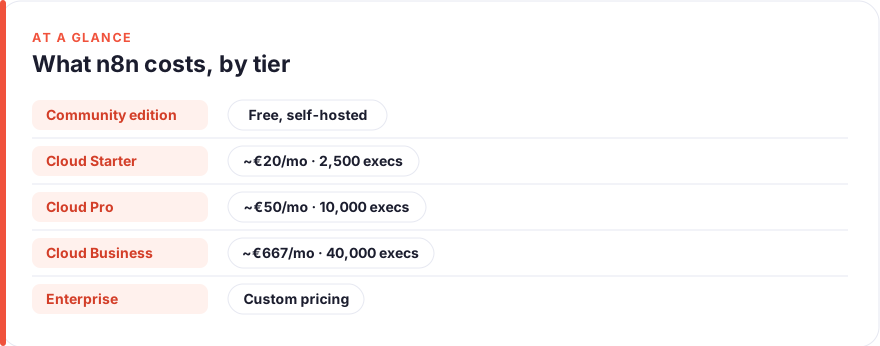
The short answer: Yes, n8n is free — if you self-host the Community Edition, which is free forever with no execution limits. What you pay for is convenience: n8n Cloud, the managed version, is a paid subscription that starts at around €20/month and is billed by workflow executions, not by the hour or per user. So “is n8n free?” really has two answers: the software is free to run yourself, but letting n8n host it for you is not.
Most people asking whether n8n is free have seen it described as “open-source automation” and want to know where the catch is. The catch is not hidden, but it is easy to misread. n8n gives you the full application to download and run on your own server at no cost, and that version is genuinely capable — the same nodes, the same workflow builder, the same integrations as the paid cloud. What the free version does not give you is someone else keeping the server running, patched, and online at 3am.
This guide breaks down every tier: what the free Community Edition actually includes, what n8n Cloud costs at each level with a worked monthly example, how the execution-based pricing really works (and how people blow through their limit without noticing), what “free” self-hosting costs once you count server time, and how n8n’s free option compares to the free plans from Zapier and Make. All prices are a snapshot as of August 2026 and change often, so treat every figure as “roughly this much” and confirm on the vendor’s own page before you commit.
Short answer: yes, with one large asterisk
n8n is free in the way that matters most to a lot of people: you can download it, install it on a machine you control, and run unlimited workflows and executions without paying n8n a cent. That is the Community Edition, and it is not a crippled trial — it is the real product.
The asterisk is that “free software” and “free to operate” are not the same thing. Self-hosting means you provide the server, handle updates, manage backups, and fix it when it breaks. For a developer or a technical team, that is a reasonable trade. For someone who just wants their automations to run reliably without touching a terminal, n8n Cloud exists precisely so you can pay to skip all of that. Neither path is wrong; they solve different problems.
One more nuance worth getting right, because it comes up constantly: n8n is source-available, not strictly open source. The code ships under n8n’s Sustainable Use License, a “fair-code” licence that lets you use, modify and self-host the software freely for your own internal business or personal use, but restricts reselling it as a hosted service. By the Open Source Initiative’s definition, a licence with commercial-use restrictions is not “open source” — so n8n itself avoids that label. For almost everyone reading this, the practical effect is nil: you can run it free for your own work. It only matters if you planned to resell n8n-as-a-service.
n8n Community Edition — what you get free forever
The Community Edition is the free, self-hosted version, and the honest headline is that it includes almost everything. You get the full node library and integrations, the visual workflow editor, custom code nodes, webhooks, and — crucially — no cap on executions. If you host it yourself, a workflow that runs ten thousand times a month costs you exactly the same as one that runs ten times: nothing, in licence terms.
What you do not get are the features n8n reserves for paid tiers, which are mostly team and governance tools rather than core automation. Things like user management with roles and permissions, SSO, environments for staging versus production, and advanced execution history and debugging views live behind the paid plans. For a solo builder or a small technical team, their absence rarely bites.
If the underlying idea of a workflow — a trigger that fires and a series of actions that follow — is new to you, our guide on how to automate repetitive tasks covers the triggers-and-actions foundation that every n8n workflow is built on. We have no affiliate relationship with n8n or any tool named here; see our disclosure for how we handle that.
n8n Cloud pricing tiers, with real monthly costs
n8n Cloud is the managed, hosted version — n8n runs the servers, applies updates, and keeps your workflows online, and you pay a monthly subscription for it. The tiers below are taken from n8n’s pricing page as of August 2026, shown at the annual-billing rate. Monthly billing and regional or USD pricing run higher, so check the vendor before you budget.
| Plan | Price (billed annually) | Executions / month | Users & workflows |
|---|---|---|---|
| Starter | €20/month | 2,500 | Unlimited |
| Pro | €50/month | 10,000 | Unlimited |
| Business | €667/month | 40,000 | Unlimited |
| Enterprise | Custom | Custom | Unlimited |
The thing to notice is what doesn’t change across tiers: every plan includes unlimited workflows and unlimited users. The only lever that moves your bill is execution volume. That is unusual and, for most people, welcome — you are not punished for adding teammates or building more automations, only for running them more often.
A worked example makes it concrete. Say you are on Starter (€20/month, 2,500 executions) and you build a workflow that checks for new form submissions every 30 minutes and one that posts a daily summary. The polling workflow runs 48 times a day, roughly 1,440 times a month; the daily one adds about 30. That is under 1,500 executions — comfortably inside Starter. Add a third workflow triggered on every new email, though, and if you receive 60 emails a day that alone is ~1,800 executions a month, and you have blown past 2,500 and need Pro (€50/month, 10,000 executions). Same two-and-a-bit workflows, very different bill — because execution count, not workflow count, is what you pay for.
What counts as an “execution” (and how people blow through their limit)
This is the single most misunderstood part of n8n’s pricing, so it is worth being precise. n8n defines an execution as a single run of your entire workflow, no matter how many steps (nodes) it contains or how much data it moves. A workflow with 3 nodes and one with 30 nodes each count as exactly one execution per run. This is genuinely different from how Zapier and Make bill, and usually cheaper — those tools charge per task or per operation, so a complex multi-step automation burns several units every single time it runs.
So how do people still exhaust their allowance? Almost always through frequency, not complexity. A few common traps:
- High-frequency triggers. A workflow polling an API every minute runs ~43,200 times a month on its own — enough to burn through even the Pro tier from a single automation. Widen the interval and the cost drops proportionally.
- Per-item triggers. A workflow that fires once for every new row, email, or webhook scales with your inbox or your traffic, not your intentions. Busy sources add up fast, as the email example above showed.
- Sub-workflows. If one workflow calls another as a sub-workflow, that counts as a separate execution. Modular designs are good practice but do multiply your execution count.
- Test and retry runs. Manual test runs during building, and automatic retries after an error, both consume executions on the cloud plans.
Self-hosting n8n free: what it actually costs in server time
“Free” self-hosting is free of licence fees, not free of everything. To run the Community Edition you need somewhere to host it, and for most people that is a small VPS (virtual private server). The good news is that n8n is light enough that a modest, cheap server handles a lot.
As of August 2026, entry-level VPS plans that comfortably run n8n start at roughly €4.50 to $6 a month — for example, DigitalOcean’s shared-CPU droplets start at $4/month, and Hetzner’s small instances sit around €4.50–€6/month. Confirm current specs and prices on the provider, but the order of magnitude is a few dollars a month, not tens. At that price, self-hosting undercuts even n8n’s Starter cloud plan on pure cash cost — if your executions are high enough to matter.
The real cost of self-hosting is not the server; it is your time and attention. You are responsible for the initial setup, security updates, database backups, and being the person who notices and fixes it when a workflow silently stops because the server ran out of memory or an update broke something. That maintenance is manageable for someone comfortable with a command line, and genuinely a burden for someone who is not. The set-and-check discipline that keeps any automation healthy — the same habit we describe in our guide to automating content repurposing — becomes your job rather than the vendor’s.
n8n free vs Zapier free vs Make free — side by side
n8n’s free offer is unusual because it is the self-hosted product, not a limited hosted tier. Zapier and Make instead give you a capped free plan on their hosted platform. That makes for a genuinely different kind of “free,” which the table below lays out. All figures are an August 2026 snapshot from each vendor’s pricing page and change often.
| n8n (Community) | Zapier (Free) | Make (Free) | |
|---|---|---|---|
| What’s free | Full self-hosted app | Hosted, capped plan | Hosted, capped plan |
| Monthly usage cap | Unlimited (you host it) | 100 tasks | 1,000 credits |
| Billing unit | Execution (full workflow run) | Task (per action step) | Credit (per module/action) |
| Workflow complexity | Unlimited steps | 2-step Zaps only | Multi-step scenarios |
| You provide | The server + maintenance | Nothing | Nothing |
| Cheapest paid tier | ~€20/mo (Cloud, 2,500 exec) | $19.99/mo (Pro, 750 tasks) | $9/mo (Core, 10,000 credits) |
The comparison rewards reading down the “billing unit” row. On Zapier’s free plan, you get 100 tasks a month and are limited to two-step Zaps (one trigger, one action), which rules out most real automations and makes the free tier mainly a way to test before paying. On Make’s free plan you get 1,000 credits a month (Make renamed “operations” to “credits” in 2026), where each action a scenario takes spends roughly one credit — so a five-action scenario run 200 times exhausts the allowance. n8n’s free tier has no such ceiling because you are running it on your own hardware; the ceiling is your server, not a billing meter.
The trade is symmetrical. Zapier and Make ask for nothing but cap your usage; n8n uncaps your usage but asks you to run the infrastructure. Which is “more free” depends entirely on whether you would rather spend money or time.
Who should pay, and who genuinely shouldn’t
You should genuinely stay free (self-hosted) if you are comfortable with a command line, you want high execution volumes without a metered bill, and you would rather spend a couple of hours a month on maintenance than €20. Developers, technical founders, and small engineering teams often land here, and for them the Community Edition is close to a no-brainer.
You should pay for n8n Cloud if your time is worth more than the subscription, you do not want to be responsible for a server at 3am, or you need the team features — roles, SSO, environments — that only the paid tiers include. Paying €20–€50 a month to make hosting someone else’s problem is a rational choice, not a failure to find the free version.
And you might not want n8n at all if you need only a handful of simple, low-volume automations and never want to see a server. In that case a hosted tool like Zapier or Make, even on a cheap paid plan, may fit your life better than either version of n8n. The best automation tool is the one you will actually keep running; for more on how we think about that trade-off, see our about page.
FAQ
Is n8n really free?
Yes, with a clear boundary. The n8n Community Edition — the self-hosted version you run on your own server — is free forever, with unlimited workflows and executions and no licence fee. What is not free is n8n Cloud, the managed version where n8n hosts everything for you; that is a paid subscription starting around €20/month. So n8n is free to run yourself, and paid if you want n8n to run it for you.
Is n8n open source?
Not by the strict definition. n8n’s code is source-available under its Sustainable Use License, a “fair-code” licence that lets you use, modify and self-host the software freely for your own business or personal use. But because that licence restricts reselling n8n as a hosted service, it does not meet the Open Source Initiative’s definition of open source, so n8n does not call itself open source. For anyone self-hosting for their own work, the practical freedoms are the same.
How much does n8n Cloud cost per month?
As of August 2026, n8n Cloud’s annual-billing rates start at roughly €20/month for the Starter plan (2,500 executions), €50/month for Pro (10,000 executions), and €667/month for Business (40,000 executions), with custom Enterprise pricing above that. Every tier includes unlimited workflows and users; only your execution volume changes the price. Monthly billing and USD or regional pricing run higher, so check n8n’s pricing page for your exact figure.
What counts as an execution in n8n?
An execution is one complete run of a workflow, regardless of how many steps it contains or how much data it processes. A 3-node workflow and a 30-node workflow each count as a single execution per run. This differs from Zapier and Make, which charge per task or operation — meaning a complex workflow on n8n Cloud costs the same as a simple one to run once. What drives your execution count is how often your workflows fire, not how complex they are.
Is it cheaper to self-host n8n than to use n8n Cloud?
On pure cash, usually yes — a small VPS that runs n8n costs roughly $5/month as of August 2026, less than the €20/month Starter cloud plan, and with no execution cap. But self-hosting adds the cost of your time: setup, updates, backups, and fixing things when they break. Once you price in a couple of hours of maintenance a month, the cloud plan is often the cheaper option overall. The right answer depends on whether your bottleneck is money or time.
n8n free vs Zapier free vs Make free — which is best?
They are different kinds of free. n8n’s free tier is the full self-hosted app with unlimited usage, but you run the server. Zapier’s free plan is hosted and effortless but capped at 100 tasks a month and two-step Zaps. Make’s free plan is hosted with 1,000 credits a month spread across multi-step scenarios. If you are technical and want volume, n8n wins; if you want zero setup for a few simple automations, Zapier or Make’s free tier is the gentler start.