
Automation How-Tos
How to Automate HR Processes (Without Losing the Human Bit)
The short answer: Automate HR by handing software the repetitive admin and keeping people in charge of every decision that affects someone’s job. Chain no-code tools like Zapier or Make with your HR system to run onboarding checklists, route leave requests, schedule interviews, manage review cycles, and approve expenses. Draw a hard line: automate the paperwork, the reminders and the routing, but never let an algorithm make the final call on hiring, firing, pay or performance. The goal is to free your people team to spend more time with people, not less.
HR runs on repetition. The same onboarding checklist for every new hire, the same leave request routed to the same manager, the same interview reschedule, the same reminder that review forms are due on Friday. Each task is small, but a People team can lose whole days to the copying, chasing and filing that sits around the actual work of looking after employees.
That repetition is exactly what software is good at, which is why HR is one of the most rewarding functions to automate. But it is also the function where automation goes wrong most visibly, because every process touches a real person’s livelihood. This guide walks through the HR processes worth automating one at a time, and it keeps returning to the same principle: automate the admin, keep the humans in charge of the decisions.
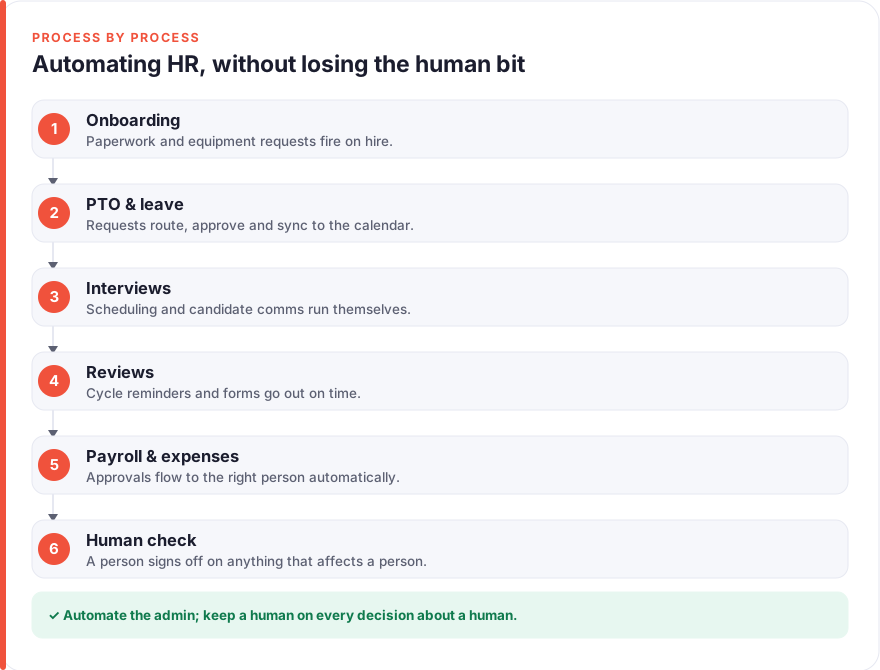
Which HR tasks are safe to automate (and which absolutely aren’t)
Before touching a single tool, sort your HR work into two piles. The dividing line is simple: does the task follow clear, repeatable rules, or does it decide something about a person’s job?
Rule-based admin is safe to automate. Sending an offer letter for signature, creating a Slack account, routing a holiday request to the right manager, reminding people that review forms are due, syncing approved leave to payroll — these follow “when this, do that” logic with no real judgement involved. Automating them removes delay and human error, and nobody loses out.
Decisions about people are not safe to automate, and this is not only an ethical point but a legal one. Under GDPR Article 22, individuals have the right not to be subject to a decision based solely on automated processing where it produces legal or similarly significant effects — and rejecting a job applicant or ending someone’s employment squarely qualifies. An AI screener that auto-rejects candidates below a score, with no meaningful human review, is the kind of thing that has drawn regulator attention across the EU, and Article 22 breaches sit in GDPR’s top fine tier. The safe pattern is to let software prepare and present, and let a person decide.
Before you start
You need three things: an HR system of record (an HRIS like BambooHR, Rippling, Gusto or Deel — or even a well-structured spreadsheet to begin with), the everyday tools your team already uses (email, calendar, Slack or Teams, e-signature), and an automation layer to connect them. For that layer, Zapier and Make are the two standards: Zapier is the quickest to learn, Make gives more control over branching and tends to be cheaper at volume. Either handles everything below.
It helps to map each process by hand first. Write down every step from, say, “offer accepted” to “fully onboarded”, and mark which steps are identical every time. Those repeatable steps are your automation candidates; the judgement-heavy moments stay human. If you are new to connecting tools this way, our guide on how to automate your business covers the trigger-and-action thinking the rest of this article builds on.
Step 1: Automate onboarding paperwork and equipment
Onboarding is the clearest early win in HR, because so much of it is identical for every hire and so much of it currently happens by hand the week someone starts. The trigger is an accepted offer. From there, a single automation can fan out into everything a new starter needs.
When the offer status flips to accepted in your HRIS or ATS, have your automation platform send the contract and policy documents for e-signature, create the accounts the person will need, drop them into the right Slack or Teams channels, raise an IT ticket for their laptop and access, and schedule their first-week calendar invites. What used to be a scramble of a dozen manual steps becomes one event that quietly sets everything in motion, so day one is ready before the new hire walks in.
Keep the warmth deliberate, though. A templated welcome is fine as long as it does not read like a system notification — personalise it with the person’s name, their manager, and a clear first action. Automating customer onboarding follows almost exactly the same shape, and our guide on how to automate customer onboarding goes deeper on pacing a welcome sequence without making it feel robotic.
Step 2: Automate PTO and leave requests
Leave is a textbook automation candidate: the request is structured, the routing rules are known, and the whole thing is pure admin. Yet at many companies it still lives in email threads and a manager’s memory.
Let staff submit time-off requests through a form or a Slack command rather than an email. The automation then checks the request against policy, routes it to the right approver, records the decision, updates the shared team calendar so everyone can see who is away, and syncs approved leave to payroll so it is accounted for correctly. Most dedicated HRIS platforms have leave management built in; if yours does not, Zapier or Make can wire a simple form to your calendar and a Slack approval in an afternoon.
The one human touch to preserve is the approval itself. Auto-approving leave sounds efficient until two people on the same small team book the same fortnight, or someone is close to burnout and a manager would have wanted to check in. Let the software gather, route and record — but keep a person clicking approve, because that click is often a small moment of care, not just a box tick.
Step 3: Automate interview scheduling and candidate comms
Recruitment is where automation saves the most time and where the “human bit” matters most, so the split has to be deliberate. The time sink in hiring is rarely the decisions — it is the logistics. Finding a slot that works across three interviewers and a candidate, sending reminders, and keeping applicants informed can eat a recruiter’s whole week.
That logistics layer is safe to automate. Use scheduling links (tools like Calendly or the scheduler built into your ATS) so candidates book into real availability without the email tennis. Templated-but-personalised updates can acknowledge every application, confirm interview details, and — importantly — tell rejected candidates promptly and kindly rather than leaving them in silence. For the wider toolkit here, our roundups of AI tools for recruiters and AI tools for HR cover what genuinely helps versus what just adds hype.
What you do not automate is the decision. It is tempting to let an AI tool rank or filter candidates and simply action the top of the list, but a screener that rejects people with no meaningful human review runs straight into GDPR Article 22, and “solely automated” rejection has no clear legal footing in the EU as of 2026. Use AI to summarise and surface if you like, but a person must read the file and make the call.
Step 4: Automate performance review cycles and reminders
Performance reviews generate a predictable wave of admin twice a year: opening the cycle, assigning forms, pairing reviewers with reviewees, chasing the people who have not filled anything in, and collating the results. All of that scheduling and nudging is automatable, and automating it is what makes a review cycle actually finish on time.
Dedicated platforms like Lattice handle the whole cycle, but you can build the essentials with your HRIS and an automation tool: when the cycle opens, send each person their form; a few days before the deadline, remind anyone outstanding; when everything is in, notify managers that results are ready to discuss. The reminders alone often rescue a cycle that would otherwise drag for weeks.
The content of a review is emphatically not for automation. AI can tidy the grammar of written feedback if someone chooses to use it, but the substance — the assessment, the rating, the development conversation — belongs to the people involved. Automate the calendar around the review; never let software write the judgement inside it. A performance outcome is exactly the kind of “similarly significant” decision that has to rest with a human.
Step 5: Automate payroll and expense approvals
Money processes reward automation because they are rule-heavy and error-prone by hand, but they are also where weak controls do real damage, so oversight is non-negotiable. The aim is to make approvals faster without making them looser.
Route expense claims and payroll changes through clear approval rules: small amounts to a line manager, larger ones up the chain, anything above a threshold or outside policy flagged for finance. Your automation platform can move each request to the right approver, push approved items into payroll or accounting, and — crucially — log every step so there is a complete audit trail. Recurring payroll runs can be scheduled, but a person should still review and release each one rather than letting it fire unattended. Expense automation shares the same DNA as other approval workflows; the principle is always route-and-flag, then let a human confirm.
The tools, ranked by team size
There is no single best HR stack; the right tools depend on how many people you support and how much complexity you carry.
- Just starting out (under ~20 people). You may not need a dedicated HRIS yet. A structured spreadsheet or a lightweight tool as your record, plus Zapier connecting a form, your calendar and Slack, covers onboarding checklists, leave requests and scheduling for very little. Add a scheduling link like Calendly and you have most of the wins above.
- Growing team (~20–200 people). This is where a proper HRIS earns its keep. Platforms such as BambooHR, Gusto or Rippling bundle records, onboarding, leave and payroll, with much of the automation built in. Most use per-employee-per-month pricing, so costs scale with headcount — check current plans directly, as tiers and add-ons change. Layer Make on top for anything the platform does not cover natively.
- Larger or distributed teams (200+, or hiring internationally). Add depth where you need it: Lattice for structured performance and engagement, Deel or Rippling for international payroll and contractor management. At this scale the automation layer stitches specialist systems together rather than replacing them.
We take a no-affiliate stance: nothing above is a paid placement, and we earn nothing if you sign up. These are the categories we would genuinely consider, and you should verify current pricing and features yourself before committing. Our disclosure page explains how we approach recommendations.
Keeping it human: three rules
Automating HR well is less about which tools you pick and more about where you stop. Three rules keep the human bit intact.
One: automate the admin, not the judgement. Anything that follows clear rules — routing, reminders, paperwork, scheduling — is fair game. Anything that decides something about a person’s job stays with a person. If you are unsure which side a task falls on, that uncertainty is your answer: keep it human until you are sure.
Two: keep meaningful human review on every significant decision. “There’s a human in the loop” only counts if that human genuinely evaluates and can overrule the system, not if they click approve on whatever the machine suggests. This is both the fair thing and, under GDPR Article 22, frequently the lawful thing.
Three: make the automated experience feel personal. A templated message is fine; a cold, systemy one is not. Use the person’s name, be specific, and make sure a real human is easy to reach the moment someone has a question the automation cannot answer. The point of automating the repetitive parts is to give your People team more time for the human parts, so make sure that time actually goes there.
Putting it together
The whole approach fits in a sentence: let software run the repetitive admin around every HR process — onboarding checklists, leave routing, interview logistics, review reminders, expense approvals — while people keep firm hold of every decision that affects someone’s employment. Each process automates the same way: find the rule-based steps, wire them together with your HRIS and a tool like Zapier or Make, and route the judgement calls back to a human.
Start with one process, almost certainly onboarding, since it is the most repetitive and the least fraught. Get it working, feel the time it saves, then move to leave, scheduling, reviews and approvals one at a time. Build incrementally and you always understand what your automations are doing — and you never wake up to discover a machine has quietly made a decision that was never its to make. For the broader picture of automating a business without losing its human character, see our guide on how to automate your business.
FAQ
Which HR processes should I automate first?
Start with onboarding. It is the most repetitive HR process, it follows clear rules, and it has an obvious trigger (an accepted offer), which makes it the easiest to automate and the one that saves the most obvious time. From a single trigger you can send documents for signature, create accounts, raise equipment requests and schedule first-week calendar invites. Once onboarding is running smoothly, move on to leave requests, interview scheduling, review-cycle reminders and expense approvals, adding one process at a time so you always understand what your automations are doing.
Is it legal to use AI to screen or reject job candidates?
Using AI to assist screening is generally fine; using it to decide is where the trouble starts. Under GDPR Article 22, people have the right not to be subject to a decision based solely on automated processing that has a legal or similarly significant effect, and rejecting a job applicant qualifies. So an AI tool that auto-rejects candidates below a score, with no meaningful human review, is legally risky in the EU and UK, and such breaches sit in GDPR’s highest fine tier. The safe pattern is to let AI summarise or surface information while a human reads each application and makes the actual decision — genuinely, not as a rubber stamp.
What does “keeping the human bit” actually mean in practice?
It means drawing a hard line between admin and judgement. Automate the tasks that follow clear rules and touch no one’s livelihood — routing a leave request, sending a reminder, booking an interview slot, filing a signed document. Keep people firmly in charge of anything that decides something about a person’s job: who gets hired, fired, promoted or paid. And where a human does review an automated output, make sure that review is real, with the ability and the time to overrule the system rather than just approve it.
Do I need an HRIS to automate HR, or can I start with what I have?
You can start small. For a team under about twenty people, a structured spreadsheet as your record plus a no-code tool like Zapier connecting a form, your calendar and Slack will cover onboarding checklists, leave requests and scheduling for very little cost. A dedicated HRIS such as BambooHR, Gusto or Rippling becomes worth it as you grow, roughly past twenty people, because it bundles records, leave and payroll with much of the automation already built in. Verify current pricing yourself, as most of these platforms charge per employee per month and change their tiers regularly.
Will automating HR make it feel impersonal to employees?
Only if you let it. The risk is real — a cold, obviously-automated message lands worse than no message at all. The fix is to automate the mechanics while keeping the tone human: personalise messages with names and specifics, make it genuinely easy to reach a real person, and be transparent that automation handles the routine so the team has more time for everything else. Handled this way, automation tends to make HR feel more attentive, not less, because the People team is no longer buried in paperwork when someone needs them.
How much time can HR automation realistically save?
It varies by team size and process, so treat any single figure with caution, but the pattern is consistent: the biggest gains come from the most repetitive, highest-volume tasks. Onboarding, leave routing and interview scheduling are usually where teams feel the difference first, because they happen often and involve a lot of copying and chasing. Rather than chasing a headline number, track the specific tasks you automate and the time each used to take — that gives you an honest measure of the return, and it tells you which process to automate next.
Where can I learn more about taskautomato’s approach?
We publish plain-English guides to no-code automation and AI tools, aiming for practical steps rather than hype, and we keep a firm no-affiliate stance so our recommendations stay honest. If you want to know more about who we are and how we think about automating the repetitive stuff without losing the human parts, our about page is the place to start.