
Automation How-Tos
How to Automate Follow-up Emails
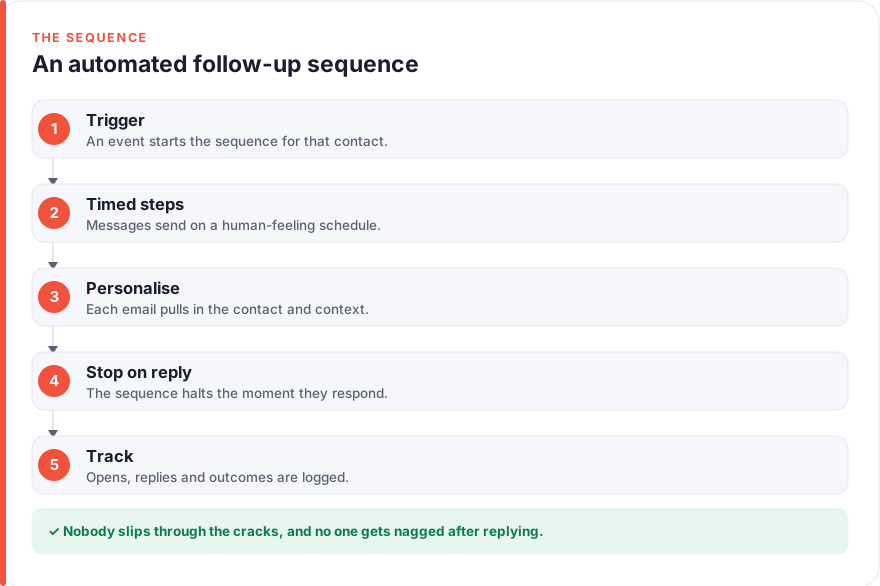
The short answer: Automate follow-up emails by wiring five stages together. Pick a clear trigger (a proposal sent, a demo booked, a form filled in), map a short timed sequence of two to four messages spaced a few days apart, personalise each one with merge fields plus a genuinely specific line, set a hard stop-on-reply rule so no chaser ever lands after someone has answered, and track replies and booked meetings so you can improve it. Tools like HubSpot sequences, your Gmail or Outlook inbox, Zapier and Calendly handle the moving parts. Set it up once and it chases for you, quietly and on time.
Follow-up is where most deals and client conversations are actually won or lost, and it is also the first thing that slips when you get busy. The proposal you sent on Tuesday needs a nudge on Friday; the prospect who booked a demo needs a reminder the night before; the client who went quiet needs a gentle check-in. None of it is hard, but all of it depends on you remembering at the right moment — and memory is exactly the thing that fails under load.
Automating follow-up hands that remembering to software. This guide is specifically about follow-up sequences — the timed, multi-touch chase that runs after a first contact — rather than general inbox tidying. If you want to automate the sorting and filing side of email, our guide on how to automate emails in Outlook covers that; here we focus on the sales and client follow-up that has to feel personal even when it is automated.
Before you start
Two decisions make everything easier if you settle them first. The first is which tool runs the sequence. If you already use a CRM, its built-in sequences are usually the right home — HubSpot sequences, for example, live right next to your contact records, so a reply or a booked meeting can stop the chase automatically. If you do not use a CRM, a lighter setup built around your existing Gmail or Outlook inbox plus Zapier will do the job. There is no single right answer; pick the one closest to where your contacts already live.
The second decision is honesty about what should be automated at all. A follow-up sequence suits situations that repeat with the same shape: chasing proposals, nurturing inbound demo requests, reminding people about booked calls. It does not suit a delicate reply to an unhappy client or a bespoke negotiation — those need your full attention, and no sequence should touch them. Automate the predictable chase; keep the judgement calls in your own hands.
Step 1: Pick the trigger that starts the sequence
A sequence needs a starting gun. The trigger is the single, unambiguous event that tells the software to begin: a proposal marked as sent, a demo booked, a contact-form submission, a deal moved to a “waiting on client” stage, or a meeting that ended without a next step agreed. The clearer the trigger, the less you have to think about follow-up ever again — it just starts itself.
Choose triggers you can actually detect. “They seemed interested on the call” is not a trigger a machine can see; “the deal moved to Proposal Sent in the CRM” is. In HubSpot you enrol a contact into a sequence manually or via a workflow when a property changes. In an inbox-plus-Zapier setup, the trigger might be a label you apply, a new row in a spreadsheet, or a form submission that Zapier watches for.
This is also the moment to be deliberate about consent and relevance. Cold, unsolicited sequences to purchased lists are a different game with real deliverability and legal risk, and they sit closer to our lead generation guide than to this one. The follow-up here assumes a warm starting point: someone you have already spoken to, quoted, or who has raised their hand.
Step 2: Map the timed sequence
Before you automate anything, write the whole sequence out as plain text — every message, in order, with the gap between each one. Automating a sequence you have not yet designed just means you make your mistakes faster.
A workable default shape for a warm follow-up is three to four touches. Something like: an initial message, a gentle nudge two days later, a short “still worth pursuing?” after another four days, and a brief final note a week after that. Spread the touches out rather than stacking them, and restrict sending to working days and working hours so nothing lands at 3am on a Sunday. Most sequence tools, including HubSpot, let you set both the delay between steps and a sending window.
The instinct to add more touches is worth resisting. A short, well-spaced sequence that respects the person’s time outperforms a relentless eight-email barrage, which mostly trains people to ignore you or mark you as spam. Fewer, better-timed, genuinely useful messages win.
Step 3: Write and personalise each message
Automation is what makes a follow-up reliable; personalisation is what stops it feeling automated. You need both. Merge fields for name and company are the floor, not the ceiling — a message that opens “Hi {first name}” and then says nothing specific is obviously a template, and people can smell it.
Keep each message short and anchor it to something real: the proposal you sent and its key number, the problem they described on the call, the deadline they mentioned. At least one line in every message should be true only for that person. In practice this means writing your sequence for a specific type of recipient and leaving a small gap you fill in before or at enrolment, rather than pretending a fully generic email is personal.
Tone matters more in follow-up than almost anywhere else, because you are, by definition, chasing. Stay warm, brief and easy to say no to. A line that makes it genuinely comfortable for someone to reply “not right now” gets you more honest answers — and more eventual yeses — than pressure ever does.
Step 4: Set the stop-on-reply rule
This is the step that separates a follow-up sequence you can trust from one that will embarrass you. The sequence must stop the instant the person replies, books a meeting, or unsubscribes. No exceptions, and no “one more scheduled email slips through.”
Native CRM sequences handle this well: HubSpot sequences automatically unenrol a contact when they reply or when a meeting is booked, which is a large part of why keeping the sequence next to your CRM is worth it. If you have built your own version around Gmail or Outlook and Zapier, you have to wire the stop condition yourself — for example, a reply or a new Calendly booking triggers a Zap that removes the person from the sequence or clears the label that drives it. Test this path deliberately before you trust the sequence with real contacts.
There is a related courtesy worth building in: make replying and opting out effortless, and honour both immediately. Someone who says “please stop” and then gets another automated nudge will remember it, and so will their spam filter.
Step 5: Track opens, replies and outcomes
Once the sequence runs itself, the job becomes improving it, and that needs numbers. Open rates are the least useful of them — inflated by image-loading privacy features and easy to over-read. The metrics that matter are reply rate and the outcome you actually want: booked meetings, signed proposals, revived conversations.
Look at where each sequence earns its replies. Often one message in the middle does most of the work while a later one adds nothing; cut the dead touch and sharpen the one that lands. Compare sequences against each other and let the results, not your assumptions, decide which framing and timing you keep. This is the same living-system discipline behind any good automated pipeline: small, regular adjustments compound.
Be patient with the data, though. A handful of sends tells you almost nothing; give a sequence enough volume before you rewrite it, or you will be chasing noise.
Step 6: Connect the sequence across your tools
Everything so far can live inside one tool. The extra leverage comes from joining your follow-up to the rest of your stack so the sequence reacts to what happens elsewhere. When a Calendly meeting is booked, the chase should pause and a reminder sequence should take over. When a prospect replies, the CRM should log it and the deal stage should move. When a form comes in, the right sequence should start on its own.
Zapier is the usual glue for the inbox-based setup — it watches one app for an event and makes another app act, no code required. In a CRM-centric setup, the CRM’s own workflows do much of this internally, which is cleaner when it is available. Either way, the principle is the same: let a trigger in one tool start, stop or branch a sequence in another, so your follow-up stays in step with reality instead of running blind.
A quick note on cost, because it shapes what is realistic. Roughly, as of July 2026 — check each vendor for current figures — Gmail and Outlook cost nothing beyond your existing account; Zapier has a free tier (around 100 tasks a month) with paid plans from about $19.99/month; Calendly is free at entry with paid tiers around $10 per seat/month (Standard) and $16 per seat/month (Teams); and HubSpot Sales Hub, which includes sequences, starts around $7 per seat/month on Starter and rises to roughly $90 per seat/month on Professional. You can build a genuinely useful follow-up system on free and entry tiers first, and only pay for more once it is clearly earning its keep.
Putting it together
A follow-up system that mostly runs itself reads as one sentence: a clear trigger starts a short, well-spaced sequence of personalised messages, each one anchored to something real, the whole thing stops the moment the person replies or books, and you track replies and outcomes so it keeps getting better. Every stage hands off to the next without you holding it in your head.
Build it in that order, and build it small. Get one sequence — your proposal chase, say — working end to end with a solid stop-on-reply before you add another. Each sequence is useful on its own, and adding them one at a time means you always understand exactly what your follow-up is doing on your behalf. For more on how we think about handing the boring, repeatable work to software while keeping the judgement calls yourself, see the taskautomato approach. We have no affiliate relationship with any tool mentioned here; how we handle that is on our disclosure page.
FAQ
What is the difference between automating follow-up emails and just automating my inbox?
Automating your inbox — sorting, filing, flagging, out-of-office replies — is about handling mail as it arrives, and our Outlook automation guide covers it in depth. Automating follow-up emails is narrower and more outbound: it is a timed sequence of messages that you send to move a specific conversation forward, such as chasing a proposal or nurturing a booked demo. The key differences are that follow-up sequences run on a schedule you design and must stop the instant the recipient replies.
How many follow-up emails should a sequence have?
For a warm follow-up — someone you have already spoken to or quoted — three to four messages spaced over a week or two is a sensible default. The point is steady, useful presence rather than volume. A short, well-timed sequence that respects the person’s time consistently outperforms a longer, more aggressive one, which tends to train people to ignore or block you. Start short, watch your reply rate, and only add a touch if the data says it earns its place.
How do I make automated follow-ups still feel personal?
Merge fields for name and company are the minimum, not the whole job. Write each message to reference something genuinely specific — the proposal and its key figure, the problem they raised on a call, a deadline they mentioned — so at least one line is true only for that recipient. In practice, build sequences for a specific type of prospect and leave a small personal gap you fill in before enrolling someone, rather than sending a fully generic email dressed up with a first name.
Which tool is best for automating follow-up emails?
It depends on where your contacts already live. If you use a CRM, its built-in sequences are usually best because a reply or booked meeting can stop the chase automatically — HubSpot sequences work this way. If you do not use a CRM, a lighter setup around your existing Gmail or Outlook inbox plus Zapier does the job, with Calendly handling booking reminders. Prices vary and change; roughly, as of July 2026, Zapier and Calendly have free entry tiers and HubSpot Sales Hub starts around $7 per seat/month, but check each vendor for current figures.
How do I stop an automated sequence when someone replies?
This is the most important rule in follow-up automation. Native CRM sequences like HubSpot’s automatically unenrol a contact the moment they reply or book a meeting. If you have built your own setup around Gmail or Outlook and Zapier, you must wire the stop condition yourself — for instance, a reply or a new Calendly booking triggers a Zap that removes the person from the sequence. Whichever route you take, test the stop path with a real reply before you trust the sequence with live contacts.
Is it worth paying for a tool, or can I automate follow-up for free?
You can build a genuinely useful follow-up system on free and entry tiers before paying anything. Gmail and Outlook cost nothing beyond your existing account, and both Zapier and Calendly have free tiers that handle a modest volume. Paid plans become worth it when your volume grows or when you want a CRM to stop sequences and log replies automatically. The sensible path is to prove the system works on free tiers first, then upgrade only the piece that becomes a bottleneck. Pricing changes, so always confirm current figures on the vendor’s own page.