
Automation How-Tos
How to Automate Lead Generation
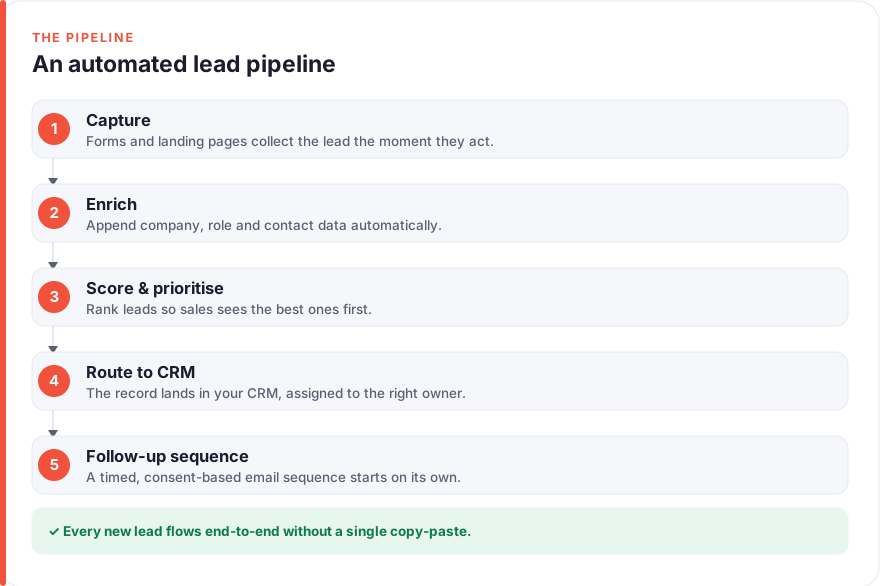
The short answer: Automate lead generation by chaining five stages with no-code tools. Capture leads through forms or landing pages, enrich them with Clearbit or Apollo, route them into a CRM like HubSpot or Pipedrive using Zapier or Make, score them against fit and behaviour rules, then trigger personalised follow-up sequences automatically. Add consent checks and list hygiene throughout so your deliverability stays healthy and you stay compliant.
Lead generation eats time in small, repetitive pieces: copying a form entry into a spreadsheet, looking up what a company does, assigning it to the right person, remembering to follow up. Done by hand, each step invites delay and human error, and the leads that slip through the cracks are lost revenue.
The good news is that almost none of it needs a developer. With a handful of connected tools you can build a pipeline that captures a lead, works out who they are, files them in your CRM, decides how promising they are and starts the conversation, all before you have finished your coffee. This guide walks through that pipeline one stage at a time.
Before you start
You will need three things in place: a place to capture leads (a form or landing page tool), a CRM to store them, and an automation layer to connect everything. For the automation layer, Zapier and Make are the two standards. Zapier is the simplest to learn; Make gives you more control and tends to be cheaper at volume. Either works for everything below.
If you are new to stitching tools together, our guide on how to automate repetitive tasks covers the basic thinking behind triggers and actions that this article builds on.
Step 1: Set up your capture forms and landing pages
Every pipeline starts with an entry point where a prospect hands over their details. This might be a contact form, a gated download, a demo request or a newsletter signup. Whatever tool you use, the one non-negotiable feature is that it can send its data onward, either through a native integration with your automation platform or by webhook.
Typeform, Tally, HubSpot Forms and Webflow forms all do this well. Keep the form itself short; every extra field costs you completions, and you are about to fill in most of the detail automatically anyway. Ask for a work email and perhaps a name, and let enrichment handle the rest.
This is also where consent lives. Add a clear, unticked checkbox explaining what the person is signing up for, and only mark someone as a marketing contact if they actively opt in. Under GDPR and similar rules, a pre-ticked box or a buried assumption is not valid consent, and it will come back to bite both your deliverability and your legal standing.
Step 2: Enrich each new lead automatically
A raw form submission is thin: often just an email and a name. Enrichment fills in the rest. Services like Clearbit and Apollo take an email address or company domain and return firmographic detail such as company name, size, industry, the person’s job title and seniority, and sometimes their location and tech stack.
Set this up as the first action after capture. When a form is submitted, your automation platform sends the email to the enrichment service, receives the enriched profile back, and carries that data forward to the next step. Suddenly “jsmith@acme.com” becomes “Jane Smith, VP of Operations at Acme, a 200-person logistics firm” without anyone lifting a finger.
Enrichment is what makes the later stages worthwhile. You cannot score or route a lead intelligently if all you know is their email, and you cannot personalise a follow-up if you do not know their role. It is the quiet workhorse of the whole pipeline.
Step 3: Route leads into your CRM
Now the lead needs a home. Connect the enriched data to your CRM so every submission lands as a proper contact record, not a line in a forgotten spreadsheet. HubSpot and Pipedrive are both well supported by Zapier and Make and both have generous entry-level tiers.
In your automation platform, add an action that creates or updates a CRM contact using the enriched fields. Map each field deliberately: email to email, company to company, job title to job title. Use “create or update” rather than plain “create” so a returning lead updates their existing record instead of spawning a duplicate.
Routing is also where ownership happens. If you have a sales team, add a rule that assigns the lead to the right person, whether by territory, company size or a simple round-robin. The lead should never sit unassigned, because an unassigned lead is one nobody feels responsible for. If you work solo or run a small consultancy, the same logic still helps you keep pipeline stages tidy; our roundup of AI tools for consultants has more on keeping a lightweight CRM under control.
Step 4: Score and prioritise leads
Not every lead deserves the same attention. Lead scoring is how you tell the difference between someone who fits your ideal customer and someone who is idly browsing. The mechanics are simple: assign points for attributes that matter and let them add up.
Score on two dimensions. Fit is about who they are: their company size, industry and job title, all of which you now have from enrichment. Add points for a senior title at a company in your target range, subtract points for a free email domain or an industry you do not serve. Behaviour is about what they do: opening emails, visiting your pricing page, requesting a demo. Add points for the strong signals.
Most CRMs, HubSpot included, have scoring built in, but you can also run it in Zapier or Make with a few conditional steps. Set a threshold: above it, flag the lead as sales-ready and notify a human straight away; below it, leave them in an automated nurture track until they warm up. The point is to spend your scarce human attention on the leads most likely to convert.
Step 5: Trigger automated follow-up sequences
Speed matters in follow-up, and automation is how you get it. The moment a lead qualifies, your pipeline should start the conversation rather than waiting for someone to notice. A follow-up sequence is a series of pre-written emails sent on a schedule, and every tool from HubSpot to a dedicated sender can run one.
Use the data you have captured and enriched to make each message feel written for one person: their name, their company, a reference to what they downloaded or requested. Space the emails like a human would, a day or two apart rather than an hourly barrage, and always build in a rule that stops the sequence the instant the lead replies. Nothing undermines trust faster than an automated “just following up” landing after someone has already answered.
Deliverability is the make-or-break here. Authenticate your sending domain with SPF, DKIM and DMARC records, warm up any new sending address gradually, and keep your volume steady rather than spiky. Send to people who opted in, make unsubscribing effortless, and honour it immediately. Good list hygiene is not just courtesy; mailbox providers watch engagement closely, and a clean, consenting list is what keeps you out of the spam folder. If your follow-up runs through Outlook, our guide on how to automate emails in Outlook covers rules and sequences there.
Step 6: Monitor, clean and improve the pipeline
A lead pipeline is never truly finished. Once it is running, watch how leads move through it. Track the conversion rate at each stage: how many captures become qualified, how many qualified become opportunities, how many follow-up sequences get a reply. The stage where the biggest drop happens is where your next improvement lives.
Cleaning matters just as much. Bounced and invalid addresses drag down your deliverability, so suppress them automatically and periodically run your list through a verification tool. Revisit your scoring rules every few weeks against leads that actually closed, and adjust the weights so the model reflects reality rather than your first guess.
Treat the whole thing as a living system. Small, regular tweaks to your forms, enrichment mapping, scoring thresholds and email timing compound into a pipeline that gets steadily better at turning strangers into customers.
Putting it together
The full flow reads as a single sentence: a lead fills in a short form with clear consent, an enrichment service fleshes out who they are, the automation layer files them in your CRM and assigns an owner, a scoring rule decides how promising they are, and a personalised follow-up sequence starts the conversation, all monitored and cleaned so it keeps performing. Every stage hands off to the next automatically.
Start small. Get capture and CRM routing working first, so no lead is ever lost, then layer on enrichment, scoring and sequences one at a time. Each piece is useful on its own, and building incrementally means you always understand what your pipeline is doing. For a wider view of the tools that make this kind of automation approachable, see our roundup of the best AI tools for entrepreneurs.
FAQ
Do I really need enrichment, or can I skip it?
You can run a pipeline without enrichment, but you lose a great deal of its intelligence. Without the extra data you cannot score leads on fit, you cannot route them by company size or industry, and you cannot personalise follow-ups beyond a first name. Enrichment is what turns a bare email into a decision you can act on, so it is usually the highest-value piece to add once basic capture and routing are working.
How much does an automated lead-gen pipeline cost to run?
It depends mostly on volume. Most CRMs, form tools and automation platforms have free or low-cost entry tiers that comfortably handle a few hundred leads a month, so a small operation can start for very little. The costs that scale are enrichment credits and CRM seats, both of which rise with lead volume and team size. Start on free tiers, confirm the pipeline delivers value, then upgrade only the pieces that become bottlenecks.
Zapier or Make: which should I choose?
Choose Zapier if you want the gentlest learning curve and the widest library of ready-made integrations; it is the fastest way to get a first pipeline live. Choose Make if you expect high volume or want fine-grained control over branching logic and data handling, as it tends to be cheaper at scale and more flexible. Both connect to every tool mentioned in this guide, so you can start with Zapier and migrate later if you outgrow it.
How do I keep automated emails out of the spam folder?
Deliverability comes down to authentication, consent and engagement. Set up SPF, DKIM and DMARC records for your sending domain, warm up new sending addresses gradually, and keep your volume steady rather than sending in sudden bursts. Just as important, only email people who genuinely opted in, make unsubscribing one click, and remove disengaged or bouncing addresses promptly. Mailbox providers reward lists that people actually open and reply to.
Is automated lead generation compliant with GDPR?
It can be, provided consent is genuine and documented. Capture explicit, unticked opt-in on your forms, tell people exactly what they are signing up for, and store the timestamp and wording they agreed to. Give people an easy way to unsubscribe or request deletion, and honour those requests promptly. Automation actually helps here, because a well-built pipeline records consent and processes opt-outs more consistently than a human juggling a spreadsheet ever could.
How long does it take to set this whole thing up?
A basic version, capturing leads and routing them into a CRM, can be live in an afternoon if your tools are already chosen. Adding enrichment, scoring rules and follow-up sequences typically takes another day or two of setup and testing spread over a week, since you will want to run test leads through each stage before trusting it with real ones. Build it incrementally rather than all at once, and you will have a working pipeline improving in stages rather than a big project that never quite ships.
Where can I learn more about taskautomato’s approach?
We publish plain-English guides to no-code automation and AI tools, always aiming for practical steps you can act on rather than hype. If you want to know more about who we are and how we think about automating the boring stuff, our about page is the place to start.