
Automation How-Tos
How to Automate Your Business: A Practical Roadmap
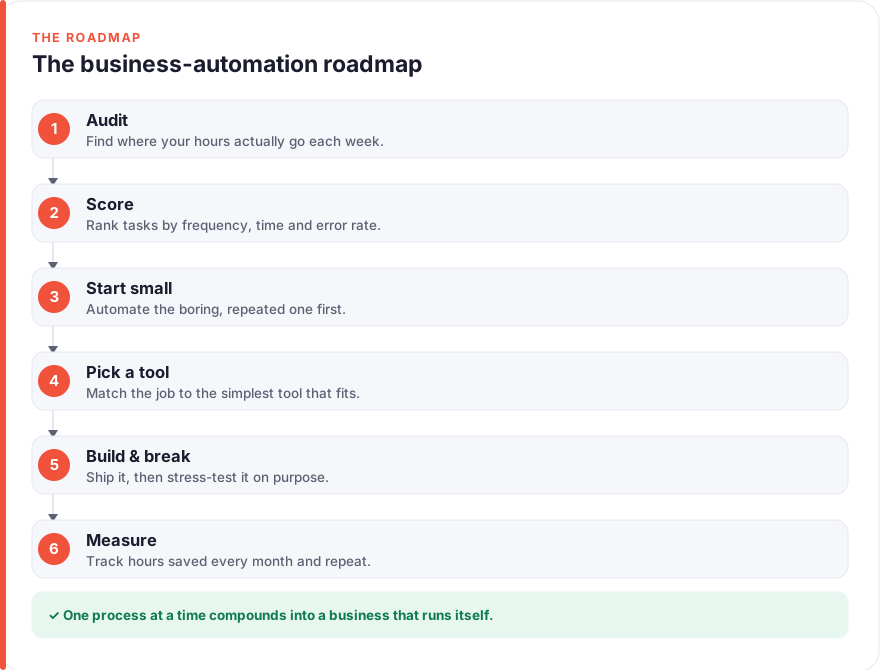
The short answer: To automate your business, work through a repeatable loop rather than a big-bang project. Audit where your hours actually go, score each recurring task by frequency, time, and error rate, then automate the single highest-scoring task first, even if it is boring. Pick the simplest tool that fits, build a minimal version, and deliberately break it with bad data before trusting it. Finally, measure the hours saved each month, and let that number point you to the next process worth removing from your day.
Most advice on how to automate a business skips the hard part and jumps straight to tools. But a pile of half-built Zaps you no longer trust is worse than no automation at all. The businesses that get real, lasting time back are the ones that treat automation as a habit: they look honestly at where the hours go, fix one process at a time, and check afterwards that it actually helped.
This is the roadmap we would give a friend starting from scratch. It is deliberately unglamorous. There is no promise that you will automate everything by Friday, and no claim that software will run your company for you. What it will do is give you a clear order of operations, so each step builds on the last, and each stage links out to a detailed guide for the specific process you are ready to tackle.
Before you start
You do not need to choose a tool, sign up for anything, or change how you work yet. Automation is a way of thinking before it is a piece of software, and the thinking is what makes the software worthwhile.
Two ideas underpin everything below. The first is that automation replaces tasks, not jobs, so you are looking for the small, repeated pieces of work inside your week rather than trying to hand off a whole role. The second is that a business is a set of processes, and a process is just a task done the same way every time. When you learn how to automate a process once, the same pattern applies to invoicing, onboarding, reporting, and almost everything else. If you have never connected two apps before, our primer on how to automate repetitive tasks covers the trigger-and-action basics this roadmap assumes.
One more thing worth saying plainly: we do not earn affiliate commissions on the tools we mention, so the recommendations here are based on fit rather than payout. You can read more about that on our disclosure page.
Step 1: Audit where your hours go
You cannot automate what you have not noticed. Before touching a single tool, spend a week or two watching where your time actually goes, because almost everyone is wrong about their own week until they write it down.
Keep it low-effort. Jot a quick line every time you do something repetitive: copying a figure from one app to another, sending the same kind of email, chasing an update, formatting the same report, re-keying an order. You are not trying to build a perfect time log. You are trying to surface the small, recurring work that hides between the tasks you think of as your real job.
By the end of the audit you should have a plain list of recurring tasks. That list is the raw material for everything that follows. Do not judge or filter it yet; a task that feels too trivial to mention is often exactly the kind of thing software does best.
Step 2: Score each task (frequency × time × error rate)
A long list of tasks is not a plan. To turn it into one, score each task on three dimensions and let the numbers decide your order, rather than your enthusiasm.
- Frequency: how often does this happen? Daily and weekly tasks are worth far more automated than something you do twice a year.
- Time: how long does one instance take, including the context-switching around it? A five-minute job done thirty times a week is a bigger prize than a one-hour job done monthly.
- Error rate: how often does it go wrong when done by hand? Manual data transfer, in particular, quietly introduces mistakes that cost far more to fix later than the task took to do.
Multiply the three together, roughly, and a ranked list falls out. The tasks at the top are frequent, slow, and error-prone, which is precisely the profile software handles best. The ones at the bottom, rare or needing genuine judgement each time, can stay with you for now. This scoring step is the difference between automating what matters and automating whatever you happened to think of first.
Step 3: Start with the boring one
Here is where most people go wrong: they pick the most interesting automation instead of the most valuable one. The interesting project is usually complex, customer-facing, and full of exceptions, which is exactly what makes it a bad first build.
Start with the boring, high-scoring task from Step 2 instead. Boring tasks are boring precisely because they are predictable, and predictable is what software needs. A workflow that files an attachment, copies a row, or sends a standard confirmation has few edge cases and rarely surprises you. When it runs cleanly for a week, you gain something more valuable than the time saved: trust in your own ability to build automation that works.
That first reliable win also changes how you see the rest of your list. Once you have watched one tedious task disappear, you start spotting others everywhere, and you have the confidence to tackle slightly harder ones. Momentum, not ambition, is what builds an automated business.
Step 4: Pick your tool (decision tree)
Only now, once you know exactly which task you are automating, does the tool question make sense. Choosing a tool before you know the job is how people end up paying for software they never really use. Work down this simple decision tree:
- Is the task entirely inside one app? Use that app’s built-in automation first. Gmail filters, Outlook rules, calendar and spreadsheet automations, and the workflow features inside your CRM or accounting software handle a surprising amount at no extra cost.
- Does the task move data between two or more apps? This is what a connector like Zapier or Make is for. Zapier is the gentlest to learn and has the widest app library; Make gives you more control and tends to be cheaper as volume grows. Either one covers everything in this roadmap.
- Is it a whole category of work, like accounting or scheduling? Reach for purpose-built software before a general connector. A dedicated invoicing or scheduling tool often automates the process out of the box, and you only add Zapier or Make to connect it to the rest of your stack.
The honest answer is that most small businesses need a mix: native features for the single-app jobs, a connector for the plumbing between apps, and one or two specialist tools for the big processes. Start with whatever the task in front of you demands, and resist buying for automations you have not built yet.
Step 5: Build it, then break it on purpose
With a task chosen and a tool picked, build the simplest version that could possibly work: one trigger, one or two actions, nothing clever. Then, before you rely on it, try to break it.
This is the step almost everyone skips, and it is the one that separates automation you trust from automation you cross your fingers over. Feed your workflow the awkward cases on purpose: the blank field, the misspelled name, the duplicate entry, the number where text should be, the email that arrives twice. Watch what it does. An automation that silently mangles bad input is more dangerous than the manual process it replaced, because it fails at scale and without anyone noticing.
Fix each failure you find. Add a filter so the workflow only runs when its conditions are truly met, use “create or update” instead of blind “create” so you do not spawn duplicates, and add a notification for the cases it genuinely cannot handle so a human gets pulled in. The goal is not a workflow that never meets a problem; it is one whose problems you have already seen and handled.
Step 6: Measure hours saved monthly
An automation you do not measure is an automation you cannot improve, and eventually one you forget why you built. The final step of the loop is to write down, in plain terms, what each workflow gives back.
Keep the measure simple: roughly how many minutes did this task take by hand, and how many times a month does it now run untouched? Multiply, and you have hours saved per month per automation. You do not need precision. You need a number honest enough to tell you whether a workflow is earning its place, and to show you which parts of your week are still done the hard way.
Review that list once a month. The review does three jobs at once: it confirms your automations are still running (apps change, connections break, fields get renamed), it retires workflows you no longer use, and it points to the next highest-value task to automate. That last part is what closes the loop. Measuring where the hours still go is really just Step 1 again, at a higher level, which is why automating a business is a habit rather than a project. For the processes that generate the numbers themselves, our guide to automating reporting shows how to make the measurement automatic too.
The 12 processes most worth automating first
Once the loop is second nature, the question becomes what to point it at. These are the processes we see pay off first for most small businesses, roughly in the order the effort-to-reward ratio tends to favour. Each links to a full walkthrough where we have one.
- Data entry — copying information between apps. Usually the highest-scoring task on any list, and the fastest win.
- Invoicing — generating, sending, and chasing invoices so cash flow stops depending on you remembering.
- Follow-up emails — the reminders and check-ins that get forgotten exactly when they matter most.
- Appointment scheduling — ending the back-and-forth of finding a time and cutting no-shows with automatic reminders.
- Lead generation — capturing, enriching, routing, and scoring new leads so none slip through the cracks.
- Customer onboarding — the welcome sequence, account setup, and first-week nudges that shape whether a customer stays.
- Expense tracking — capturing receipts and categorising spend as it happens, not in a painful monthly scramble.
- Reporting — pulling numbers together into the dashboards and summaries you currently rebuild by hand.
- Email marketing — segmenting your list and sending the right sequence to the right people automatically.
- Repetitive one-off tasks — the miscellaneous small jobs that do not belong to any one process but add up all the same.
- Internal notifications — telling the right person when something changes, so nobody has to keep checking. Most of this lives inside your existing tools’ native alerts or a simple connector step.
- Document and file organisation — routing attachments, contracts, and exports into the right folder automatically, so nothing has to be filed by hand.
You will not, and should not, automate all twelve at once. Run each through the scoring in Step 2, take the top one, and work the loop. The list is a menu, not a checklist.
What not to automate
Automation has a boundary, and knowing where it sits is part of doing this well. Some work should stay in human hands, at least for now.
Avoid automating anything that needs genuine judgement every time it happens. If explaining the task honestly requires a lot of “it depends”, it has too many exceptions to hand off cleanly, and a rigid rule will produce confidently wrong results. The same goes for high-stakes, low-frequency decisions: hiring, pricing changes, difficult customer conversations, anything where a mistake is expensive and the task is rare enough that automating it never pays back the effort.
Be especially careful with the human moments in your business. A warm reply to an unhappy customer, a personal note to a long-standing client, a nuanced negotiation: these can be supported by automation, such as an AI step that drafts a starting point for you to rewrite, but they should not be sent on autopilot. Customers can tell the difference, and the goodwill you lose from an obviously robotic touch usually costs more than the minutes you saved. The aim of automating a business is to free up your attention for exactly this kind of work, not to remove yourself from it. You can read more about how we think about this on our about page.
FAQ
How do I start automating my business if I have never done it before?
Start by auditing where your time goes for a week, writing down every task you repeat. Score each one by how often it happens, how long it takes, and how error-prone it is, then automate the single highest-scoring task first using the simplest tool that fits, often a built-in feature or a connector like Zapier. Get that one working reliably before adding anything else. Building the habit on one small, boring task teaches you far more than attempting a big automation project all at once.
How do I automate a business process specifically?
Break the process into individual tasks and treat each as its own “when this happens, do that” rule. Identify the trigger that starts the process, map the steps it currently takes by hand, and rebuild the most mechanical of those steps in a no-code tool, testing with real data as you go. Automate one step at a time rather than the whole process at once, so you always know which part works and which needs attention. Most processes, from invoicing to onboarding, follow this same pattern.
Which tasks should I automate first?
Automate the tasks that are frequent, time-consuming, and error-prone, which for most businesses means some form of manual data entry, invoicing, or follow-up. Score your recurring tasks on frequency, time, and error rate, then start at the top of that ranked list rather than with whichever automation seems most interesting. The boring, predictable tasks are both the easiest to automate reliably and often the ones quietly costing you the most time.
What is the best tool to automate a business?
There is no single best tool; the right one depends on the job. Use your apps’ built-in automations for work inside a single app, a connector like Zapier or Make to move data between apps, and purpose-built software for whole categories like accounting or scheduling. Most small businesses end up with a mix of all three. Choose the tool only after you know exactly which task you are automating, never the other way around, so you do not pay for software you never fully use.
How much time can automating my business realistically save?
It varies with how much repetitive work your business carries, so the honest answer is to measure it rather than trust a headline figure. Record roughly how long each task took by hand and how many times a month it now runs automatically, and the hours saved add up from there. The gains compound: one automation might save a few minutes, but a handful running quietly in the background return meaningful time each week. Measuring your own numbers is far more useful than any promised average.
What should I not automate?
Do not automate work that needs real human judgement every time, high-stakes decisions that happen rarely, or the personal moments customers value, such as sensitive replies and genuine relationship-building. If describing a task honestly involves a lot of “it depends”, it has too many exceptions to automate cleanly and is better kept manual or broken into smaller, clearer rules. The point of automating a business is to free your attention for this kind of work, not to remove the human from it.