
Automation How-Tos
How to Automate Content Repurposing
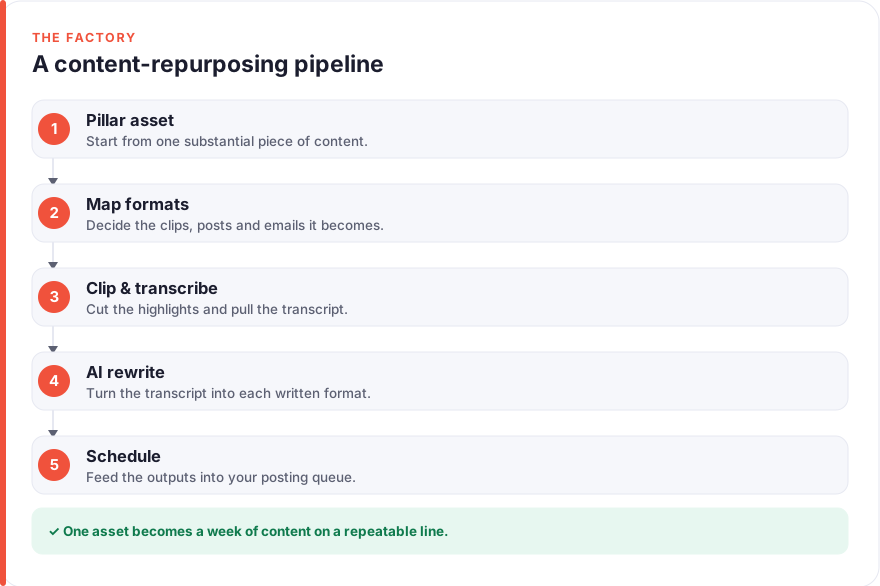
The short answer: Automate content repurposing by turning one pillar asset into many formats on a fixed pipeline. Pick a substantial source — a long video, podcast or article — and decide up front what it becomes: clips, a thread, a newsletter section, quote graphics. Use Opus Clip to cut short clips and Descript for a clean transcript, then ChatGPT to draft the written formats and Canva for the visuals. Finally, connect the pieces with Zapier so each finished asset flows into your scheduler and calendar, and run every future pillar down the same path.
Most people create content the hard way: a fresh idea for every platform, every week, starting from a blank page each time. It is exhausting, and it wastes the best thing you already have — a substantial piece of work with far more mileage in it than a single publish. A one-hour podcast holds a dozen short clips, three or four written posts, a newsletter section and a handful of quotable lines. Repurposing is simply the discipline of extracting all of that instead of letting it expire after one use.
The trap is doing that extraction by hand, which turns a good idea into an afternoon of exporting, rewriting and resizing. This guide is about the opposite: building a repeatable pipeline where one pillar asset flows into many formats with tools doing the mechanical work. It is deliberately not about the posting itself — scheduling and publishing are their own workflow, covered separately in our guide to automating social media posting. Here, the focus is the factory that produces what those queues get filled with.
Before you start
You need one thing above all: a pillar asset worth the effort. Repurposing multiplies whatever you feed it, so a thin, forgettable source produces thin, forgettable spin-offs. Have a genuinely useful long video, podcast episode or article ready before you build anything around it.
It also helps to know the basic shape of an automation — a trigger that starts a process and an action it carries out — because the final step wires these together. If that idea is new, our guide on how to automate repetitive tasks covers the triggers-and-actions thinking this pipeline is built on. Have logins ready for whichever tools you choose, and note that we have no affiliate relationships with any tool mentioned here; see our disclosure for details on how we cover them.
Step 1: Choose one pillar asset worth repurposing
The whole system stands or falls on the source you pick. A pillar asset is a single, substantial piece with enough distinct ideas inside it to travel in several directions — typically a long-form video, a podcast episode, a webinar recording or a thorough written guide. If you can already picture three or four different posts hiding inside it, it is a good candidate.
Resist the urge to repurpose everything. A short, one-note update does not have the raw material to justify a pipeline, and forcing it through one only produces filler. Choose depth over frequency: one rich asset a week, fully repurposed, will out-produce a scramble of small posts made from scratch. The goal is leverage, and leverage needs something substantial to act on.
Step 2: Map the formats it becomes
Before touching any tool, decide what a pillar asset turns into every single time. This template is what makes the process repeatable rather than a fresh creative decision each week. A common, sensible map from a single video or podcast looks like this:
- Short clips — three to five vertical cuts of the most engaging moments, captioned for silent viewing.
- A text thread — the core argument broken into a sequence of short posts for X, LinkedIn or Threads.
- A newsletter section — a tighter written summary with a link back to the full asset.
- Quote graphics — a handful of the strongest lines set as on-brand images.
Write your map down and keep it fixed. When every pillar produces the same set of outputs, you can template the prompts, the folders and the automations around it, which is what turns repurposing from a chore into a system. This same “one idea, many formats” thinking sits at the heart of most AI tools for content creators, and the map is simply your version of it on paper.
Step 3: Cut the clips and pull the transcript
With a plan in place, start extracting. Two jobs happen here: pulling short clips out of long video, and getting a clean transcript that will feed every written format later.
For clips, a tool like Opus Clip (free plan, with paid tiers from roughly $15/month) scans a long video, identifies the moments most likely to perform, and produces captioned vertical cuts ready to post. It automates the tedious part — hunting for the good bits and adding subtitles — though you should always watch the suggestions before trusting them, since an algorithm’s idea of a highlight is not always yours.
For the transcript, Descript (free tier, with paid plans from roughly $16/month) edits audio and video by editing the text, and exports a clean transcript you can reuse everywhere. That transcript is the single most valuable by-product of this step: it is the raw material your written formats in Step 4 are built from. All prices here are a July 2026 snapshot and change often, so treat them as “roughly this much” and confirm on each vendor’s site, ideally starting on a free tier to prove the workflow before you pay.
Step 4: Turn the transcript into written formats with AI
Now the transcript earns its keep. Instead of writing a thread, a newsletter blurb and a caption set from scratch, you feed the transcript to an AI assistant and ask it to reshape the same ideas into each format. ChatGPT (free, or Plus at roughly $20/month) is well suited to this, and the quality depends almost entirely on how specific your prompt is.
Write one saved prompt per output in your map, for example:
- Thread: “Turn the key argument in this transcript into a seven-post thread for LinkedIn. Keep each post under 280 characters, lead with the strongest point, and write in a plain, measured voice.”
- Newsletter: “Summarise this transcript in 150 words for a newsletter, ending with one sentence that links back to the full episode.”
- Captions: “Write three social captions for the clips from this transcript, each with a clear hook and no hashtags.”
The AI drafts in seconds, but the draft is a starting point, not a finished post. Read every output against the transcript to catch anything it has overstated or invented, and edit it into your own voice. AI handles the reshaping; you keep the accuracy and the judgement. The same pattern — one source, many AI-drafted outputs — shows up across the AI tools for marketers that teams lean on to keep a content calendar full.
Step 5: Produce the graphics at scale
Visuals are usually the step people dread, because designing a dozen on-brand images by hand is slow. Templates fix that. Canva (free, with Pro at roughly $15/month) lets you build a quote-card template once, then drop your strongest lines into it to generate a whole set in minutes.
The trick is to prepare the template before you need it. Set up one or two layouts that match your branding, save your colours and fonts in a Brand Kit, and then repurposing becomes pure assembly: paste a line, swap the background, export. Because the design decisions were made once, up front, every graphic comes out consistent without fresh effort, which is exactly what lets you produce them at the volume a repurposing pipeline demands. Pull your quotable lines straight from the transcript you cleaned in Step 3, so the words are already verbatim and on-message.
Step 6: Wire it into a repeatable pipeline
The final step is what separates a one-off repurposing session from an automated system: connecting the pieces so a finished asset moves through the process without you shuttling files by hand. An automation layer like Zapier (free tier, paid from roughly $20/month) is the plumbing that carries each output from where it is made to where it needs to go.
A few reliable patterns cover most of this:
- Route finished pieces automatically. When a new clip or graphic lands in a designated folder or spreadsheet row, have the automation add it to your scheduler’s queue, so producing a piece and queuing it become one motion.
- Trigger the pipeline from a source. When a new podcast episode or video appears in a feed or folder, kick off a checklist or draft so nothing sits forgotten.
- Keep a single content calendar. Have each format write itself into one central calendar as it is created, so you can see at a glance what a pillar produced and where it is scheduled.
Build the simplest version first — one trigger, one action, tested with real files — then add steps once it runs cleanly. Just as important, templatise the human parts: keep your prompt library, your Canva templates and a fixed folder structure so the next pillar asset runs the exact same path. Once your queue is full, the actual publishing is handled by the social posting system that sits downstream of this one.
Common pitfalls to avoid
A few mistakes turn repurposing from leverage into noise. The first is repurposing weak sources: multiplying a thin idea just spreads thin content across more channels. Be selective about what earns a pillar’s treatment, and let genuinely useful work carry the pipeline.
The second is publishing AI drafts unread. The transcript-to-format step is fast precisely because AI does the reshaping, but it can overstate a claim or smooth a nuance into something you did not mean. Every draft needs a human read against the source before it goes out — automate the drafting, never the responsibility. The third is treating each format as identical: a clip, a thread and a newsletter section have different shapes and audiences, so the same idea should be adapted to each, not copy-pasted flat. And the fourth is letting the pipeline run without ever reviewing what lands — glance at which formats actually earn engagement and prune the ones that do not, the same set-and-check habit that keeps any automation healthy. You can read more about how we approach that testing on our about page.
FAQ
What is content repurposing?
Content repurposing means taking one substantial piece of content and reshaping it into multiple formats for different channels, rather than creating each post from scratch. A single podcast episode, for example, can become short clips, a written thread, a newsletter section and a set of quote graphics. The point is leverage: you extract far more value from work you have already done, and reach audiences who prefer different formats without multiplying your effort.
How do I automate content repurposing without a developer?
You automate it by chaining together no-code tools, each handling one stage. A clip tool like Opus Clip cuts short videos, Descript produces a transcript, ChatGPT drafts the written formats, and Canva templates generate the graphics — then an automation layer like Zapier routes each finished piece into your scheduler and calendar. None of this needs code; the skill is in mapping the pipeline once and saving your prompts and templates so every future asset runs the same path.
Which tools are best for repurposing video into other formats?
For turning long video into short clips, Opus Clip is purpose-built and finds and captions highlights automatically. Descript is strong for editing and exporting a clean transcript, which then feeds everything text-based. ChatGPT reshapes that transcript into threads, captions and newsletter copy, and Canva handles the quote graphics. There is no single best tool, only the best fit for your source format and budget, and most offer free tiers so you can trial the workflow before paying.
How much does it cost to automate content repurposing?
Less than you might expect, and often nothing to start. Opus Clip, Descript, ChatGPT, Canva and Zapier all offer free tiers that comfortably cover a solo creator testing the workflow. Paid plans, if you outgrow the limits, run from roughly $15 to $35 per month each — all July 2026 snapshots that change often, so check the vendor. Start free, prove the pipeline works, then upgrade only the one tool that becomes a bottleneck.
Should I edit AI-generated repurposed content before publishing?
Yes, always. AI drafts the reshaped formats quickly, but it can overstate claims, lose nuance or occasionally invent detail, so every output needs a human read against the original source before it goes out. Treat the AI as a fast first-draft writer, not a final editor. The time you save on the mechanical reshaping is exactly what frees you to check accuracy and adjust the voice, which is where the quality lives.
How is repurposing different from automating social media posting?
Repurposing is about producing many formats from one source; posting is about publishing them on a schedule. This guide covers the production factory — extracting clips, drafting text, making graphics — that fills a queue. Getting those pieces onto each platform at the right time is a separate workflow, which our guide to automating social media posting covers in full. In practice the two connect: the repurposing pipeline produces the content, and the posting system publishes it.