
Automation How-Tos
How to Automate Email Marketing
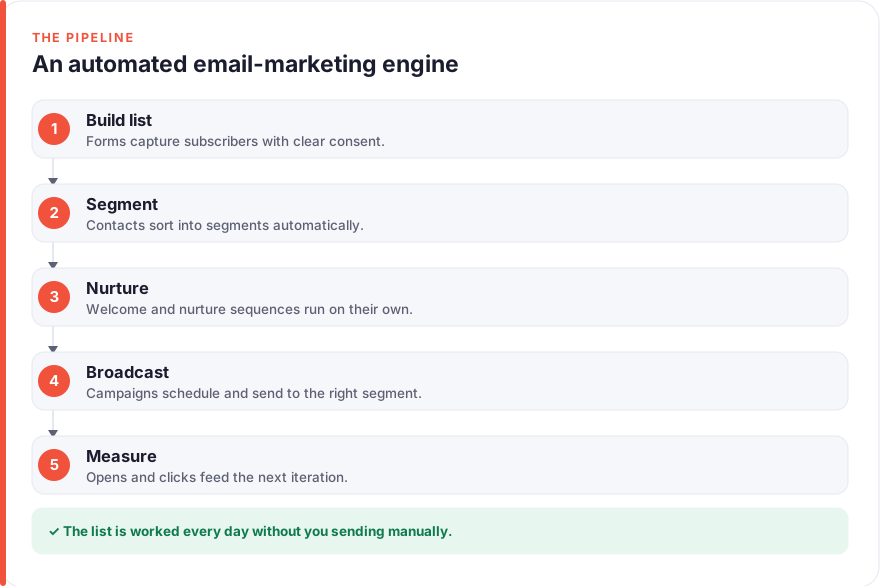
The short answer: To automate email marketing, pick a platform like Mailchimp, Klaviyo, or HubSpot and connect it to your sign-up forms so new subscribers arrive with clear consent. Sort them into segments automatically, then build welcome and nurture sequences that trigger on what each person does. Schedule your broadcasts and newsletters ahead of time, lean on AI tools like ChatGPT for first drafts, and use Zapier to connect anything your platform cannot reach natively. Finally, track opens, clicks, and deliverability, and feed the results back into your segments so the program keeps improving with little day-to-day effort.
Email marketing is unusually well suited to automation, because so much of it is the same work repeated for each new subscriber: sending a welcome message, following up a few days later, sorting people by interest, and remembering who has already heard which pitch. Done by hand, that quickly becomes unmanageable past a few hundred contacts, and the personal touches slip first.
The aim of this guide is a program that mostly runs itself. New subscribers join your list, get sorted into the right segment, receive a welcome and a nurture series timed to their actions, and see the occasional broadcast, all while you watch the numbers rather than push the buttons. None of it needs code. This is specifically about the email program itself, sequences, segments, deliverability, and broadcasts, rather than the wider lead pipeline that feeds it, which we cover separately in how to automate lead generation.
Before you start
You need three things: an email platform that supports automation, a place for people to sign up, and clear permission to email them. The platform is the hub, so choose it first. Mailchimp is the most approachable and has a free tier for up to 250 contacts (roughly, July 2026, so check the vendor for current limits). Klaviyo is stronger for e-commerce, with a free tier of up to 250 contacts and 500 sends a month. HubSpot bundles email into a broader CRM and offers free email tools to start, with paid marketing plans from around $20 per seat a month (less on annual billing). All three prices should be treated as ballpark figures, so confirm them on the vendor’s own pricing page before you commit.
You do not need every feature on day one. A working list, one welcome email, and a way to send a newsletter is enough to begin; everything else in this guide layers on top of that foundation.
Step 1: Pick and connect your email platform
Your email platform is where subscribers live, where sequences run, and where your results show up, so it is worth a little thought. Weigh three things: the tools you already use, the kind of automation you need, and your budget. If you sell products online, Klaviyo’s deep store integrations earn their keep. If you want a simple newsletter and light automation, Mailchimp is quick to learn. If email is one part of a larger sales and marketing setup, HubSpot keeps everything under one roof.
Once you have chosen, connect it to your website and your sign-up forms so subscriber data flows in without anyone re-typing it. Most platforms give you an embed code or a native integration for common site builders, and for anything they do not cover natively, Zapier can bridge the gap. Zapier’s free tier handles 100 tasks a month, with paid plans from about $20 a month (again, roughly, July 2026, so check the vendor), which is plenty for connecting a form tool or store to your email platform.
Step 2: Automate list building and consent
An email program is only as good as the list behind it, and the healthiest lists are built on genuine permission. Set up sign-up forms, pop-ups, or embedded capture points that write new subscribers straight into your platform, so there is no manual export-and-import step to forget. A short form asking for an email, and perhaps a first name, converts better than a long one.
Consent is not a formality here; it is what keeps your program deliverable and compliant. Use a clear, unticked opt-in that spells out what someone is signing up for, and only add people who actively agree. Buying lists or adding contacts who never opted in is the fastest way to wreck your sender reputation and land in the spam folder. Where you can, store the moment and wording of consent against each subscriber, so you have a clean record if a question ever arises.
Step 3: Segment your audience automatically
Sending the same email to everyone is the quickest way to bore your list and grow your unsubscribe rate. Segmentation fixes that by sorting subscribers into groups so each one hears things that are actually relevant. The trick is to let the platform do the sorting on rules you set once, rather than maintaining lists by hand.
Useful segments almost always come from data you already collect. Sort by how someone signed up, so a person who downloaded a pricing guide is treated differently from a newsletter subscriber. Sort by behaviour, such as who opened your last three emails or clicked a particular link. If you sell products, sort by purchase history, so first-time buyers and repeat customers get different messages. Every major platform lets you define these as dynamic segments that update themselves as behaviour changes, which means a subscriber can move from “new” to “engaged” to “customer” without you touching a thing.
Segmentation is what makes the later stages pay off. A welcome sequence written for one audience, or a broadcast aimed at the right segment, lands far better than a blast to your whole list. It is the quiet groundwork that everything else stands on.
Step 4: Build welcome and nurture sequences
Sequences are where email automation shows its full value. A sequence is a series of pre-written emails that send automatically when a subscriber takes an action, and the two you should build first are a welcome and a nurture series.
The welcome sequence triggers the moment someone joins. Its job is to make a good first impression while attention is high: thank them, set expectations for what you will send, and deliver whatever you promised at sign-up. A nurture sequence goes further, guiding a subscriber over days or weeks with content that educates and gradually warms them toward a purchase or deeper engagement. Space the emails a day or two apart rather than piling them up, write in a human voice, and always include a rule that pauses or adapts the sequence when someone replies or buys, so the automation never talks over a real conversation.
Drafting all this copy is where an AI assistant helps. Tools like ChatGPT, free to start with a Plus tier at around $20 a month, can turn a rough outline into a first draft of a welcome email or a five-part nurture series in minutes. Treat the output as a starting point to edit in your own voice rather than something to paste in unread; the judgement stays yours, but the blank page disappears. Our roundup of AI tools for marketers covers more of these drafting and ideation assistants.
Step 5: Schedule and automate broadcasts
Sequences handle the automated, subscriber-triggered side of email. Broadcasts are the one-off sends: a newsletter, a product announcement, a sale. You cannot fully automate the decision of what to say, but you can remove almost all the friction around sending it.
Plan broadcasts in advance and schedule them rather than sending live. Every platform lets you compose a campaign, choose the segments it should reach, and set it to go out at a chosen time, which means you can prepare a month of newsletters in one sitting and let them release on their own. Sending to the right segment matters as much here as in your sequences; a broadcast aimed at engaged subscribers or a relevant purchase group will always outperform a blast to everyone. Lean on AI again for first drafts of subject lines and body copy, then edit for accuracy and tone before you queue anything. The same scheduling discipline that keeps a social media posting calendar consistent works just as well for an email one.
Step 6: Measure, protect deliverability, and refine
An automated program still needs watching, but the watching is mostly reading numbers rather than doing chores. Your platform reports opens, clicks, and unsubscribes for every send; use them to see which subject lines, segments, and sequences actually work, and feed those lessons back into your targeting.
Deliverability deserves particular attention, because none of the rest matters if your emails land in spam. Authenticate your sending domain with SPF, DKIM, and DMARC records, keep your sending volume steady rather than spiky, and remove bouncing or long-inactive addresses regularly so your engagement rates stay high. Mailbox providers watch how people react to your mail closely, and a clean, engaged list is what keeps you in the inbox. Set the platform to alert you if a metric drops sharply, and treat that as your cue to look, rather than checking obsessively.
The payoff is a program that compounds. Small, regular adjustments to your segments, sequence timing, and subject lines add up, so the same automated system quietly gets better at reaching the right people with the right message.
Common pitfalls to avoid
A few mistakes trip up most people automating email for the first time, and all of them are avoidable once you know to look:
- Automating a bad list. Buying contacts or adding people who never opted in poisons your deliverability no matter how good your sequences are. Grow the list on genuine consent or the rest is wasted effort.
- Set-and-forget sequences. An automated welcome series written a year ago can quietly reference an offer you no longer run or a product you have renamed. Review your live sequences every few months as you would any other content.
- Over-mailing. Just because you can send automatically does not mean you should send often. Too many emails drive unsubscribes and spam complaints faster than almost anything else, so respect your subscribers’ inboxes.
- Ignoring deliverability. Skipping SPF, DKIM, and DMARC, or letting dead addresses pile up, sends your carefully written emails to spam. Treat inbox placement as a first-class metric, not an afterthought.
- Pasting AI copy unread. AI drafts save time, but sending them without an edit risks a wrong claim, an off-brand tone, or an awkward line reaching your whole list. Always review before you schedule.
FAQ
What is the best way to start automating email marketing?
Start by choosing an email platform that supports automation, such as Mailchimp, Klaviyo, or HubSpot, and connecting it to your sign-up forms so subscribers arrive automatically with clear consent. Then build one simple welcome email that triggers when someone joins. That single automation already delivers a timely first message to every new subscriber, and you can layer on segmentation, nurture sequences, and scheduled broadcasts from there once the basics work.
Which email marketing platform should I choose?
It depends on your business. Mailchimp is the most beginner-friendly and has a free tier for a small list, which suits newsletters and light automation. Klaviyo is built for e-commerce, with deep store integrations that make purchase-based segments easy. HubSpot fits if email is part of a wider CRM and sales setup. All three offer free or low-cost starting tiers, so trial one before committing, and check current pricing on the vendor’s own page, as plans change.
How much does it cost to automate email marketing?
You can start for very little. Mailchimp, Klaviyo, and HubSpot all offer free tiers that cover a small list, and paid plans typically begin somewhere around $13 to $20 a month, rising with your contact count (roughly, July 2026, so confirm with the vendor). Add a tool like Zapier from about $20 a month if you need to connect apps your platform does not reach natively, and an AI assistant such as ChatGPT at around $20 a month if you want help drafting. Costs scale mainly with list size, so start small and upgrade only as you grow.
How do I keep automated emails out of the spam folder?
Deliverability comes down to authentication, consent, and engagement. Set up SPF, DKIM, and DMARC records for your sending domain, only email people who genuinely opted in, and keep your sending volume steady rather than sending in sudden bursts. Just as important, remove bouncing and long-inactive addresses regularly and make unsubscribing easy, because mailbox providers reward lists that people actually open and reply to. A clean, permission-based list is your best protection against the spam folder.
Can I use AI to write my marketing emails?
Yes, and it is one of the biggest time savers in an automated program. An assistant like ChatGPT can turn a rough outline into a first draft of a welcome email, a nurture sequence, or a newsletter in minutes. The important caveat is to treat AI output as a starting point: edit it into your own voice, check any claims or figures, and never schedule a draft you have not read. The judgement stays with you; AI just removes the blank page.
How is automating email marketing different from automating lead generation?
Lead generation is about capturing and qualifying prospects across your whole funnel, often before they ever join your email list. Email marketing automation picks up once someone is a subscriber, and focuses on the email program itself: segmenting the list, running welcome and nurture sequences, scheduling broadcasts, and protecting deliverability. The two connect, since good lead generation feeds your email list, but they are distinct jobs. For the upstream half, see our guide on how to automate lead generation.
How does taskautomato make money from these recommendations?
We recommend tools on merit, not on commission. We hold no affiliate relationships with the platforms mentioned in this guide, so the links here are plain references rather than paid placements. You can read the full detail on our disclosure page, and learn more about how we test and write about automation on our about page.